Monday, May 25, 2015

Best Social Media Collaboration Platforms

Social media is not about conversations only, but it is also about collaboration also. Keeping this in mind, it would be interesting to take a look at some of the most well known digital tools available to help collaboration.

Here are 7 Best Social Media Collaboration Platforms:

1. Atlassian Confluence: It offers a powerful wiki-based solution to enterprise collaboration. Using this tool, content can be simply dragged and dropped from the desktop to the platform, thus eliminate the need for keeping track of attachments sent via email.


2. Google Documents:  Simultaneously reading and editing of files makes Google Docs ideal for students and other casual collaborative groups. The updated version of Google apps offers additional security options for business. 


3. Adobe Acrobat: It allows teams to work collaboratively on documents through their browsers. Various options on Adobe Acrobat for web conferencing and screen-sharing provide additional communication channels.

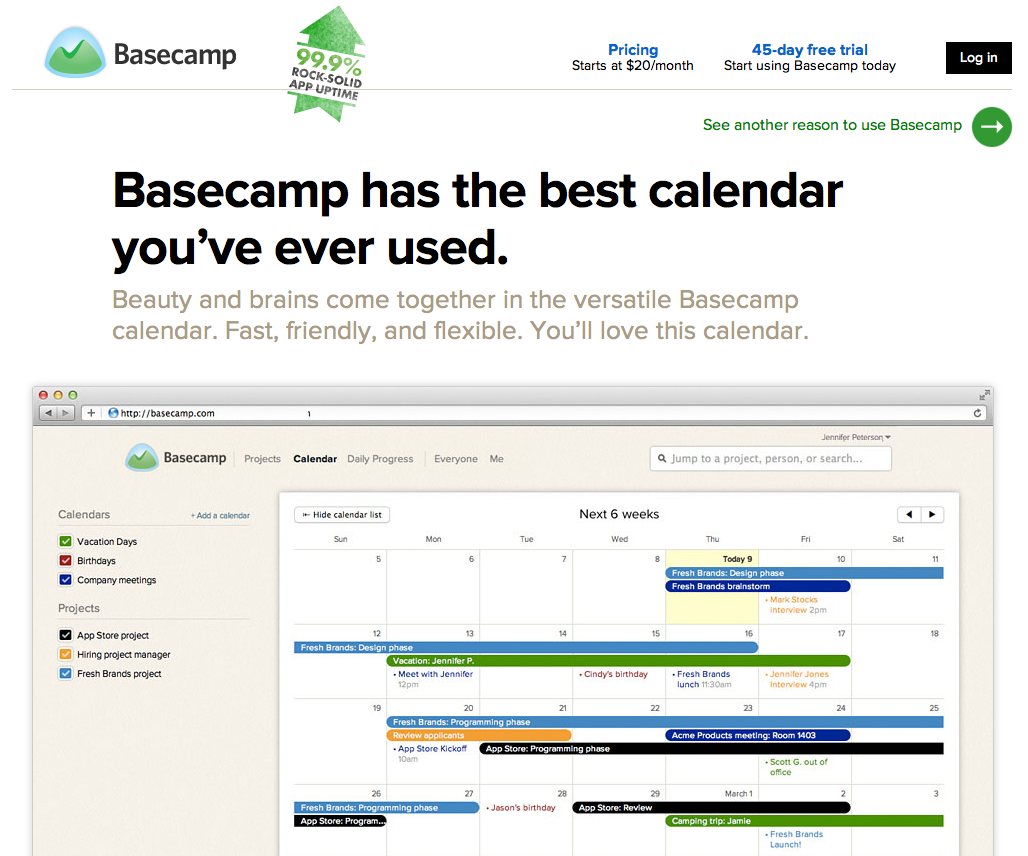
 4. Basecamp: This platform offers collaborative messaging and file sharing. Using Basecamp, project management can be easily tracked with milestones and deadlines. A team can set up to-do lists, calendars, projects & more all at one easy to login site.
5. Sharepoint: It provides a single platform for employees to work collaboratively through various methods such as wikis and work flows. Here you can create personal profiles which allow teams to better understand each other’s skills, interests and experience.


6. Tibbr: This collaboration platform uses a design that is familiar to Facebook users. One key feature is the ability for employees to follow subjects, stay tuned on news and developments in their area of business.


7. Socialcast:  It allows employees to discuss projects remotely through a micro-blogging service, accessible from smart phone. The Town Hall extension on Socialcast enables discussion between executives and employees.


So, these were the seven social media collaboration platform that you can use. And, if you are using any other platform, then please share with us.

Friday, May 8, 2015

Online Collaboration Alternatives To Sharepoint For Small Businesses to Increase Productivity

If you want to run business in today's competitive economy, then you need to gain more flexibility, enhanced information exchange and collaborative teamwork. Well, this shows the importance of collaborative technology.

Today, Microsoft SharePoint is the most prominent solution for collaboration. It is an on-premise collaborative software model, but is more suited to big businesses with huge IT budgets and large number of employees. Microsoft Share-point also has some disadvantages like huge setup costs, no email functionality, software complexities, and costly training and support issues.

But, the SAAS (software-as-a-service) approach gives small businesses a viable alternative to access this software over the Internet at reasonable fees. Here are some packages that could offer valuable productivity gains for small businesses that host websites on 100TB servers:

1. HyperOffice:
It is an alternative solution for the small businesses moving from on-premise software such as Microsoft SharePoint to the cloud. Small Businesses need only a broadband connection to access this robust software solution at low costs. Some other benefits includes HyperOffice  has that lack in SharePoint include email functionality, drag and drop portal publisher, an interactive Gantt chart in place of the static Gantt chart in SharePoint and forums.


2. Box.com: This is one of the best Business collaboration software alternative offers a scalable, affordable and simple alternative. Box.com provides small businesses with features such as file storage, file collaboration and content management on the cloud. Also, it is simple to synchronize your files on the desktop, receive feedback at a nominal price and share them with colleagues.


3. Huddle: This alternative is one of the best cloud collaboration tools. It is designed with ease and efficiency in mind, and thousands are using it for enterprise collaboration and content management. Small businesses can easily manage and exchange information or projects with others using Huddle. It also allows you to track project deadlines, view late projects, milestones, completed tasks and even reassign projects, thus making collaboration easy and efficient.


4. Google Apps: This is a free alternative to Microsoft SharePoint. Google Apps offers simplicity, efficiency and clarity, allowing small businesses to organize the day-to-day schedules, files, projects and teams securely. Some other features offered include easy navigation, advanced searches, email integration and free conference calls.


So, these were the four alternatives to Microsoft Sharepoint that small businesses can use and increase their productivity.

Saturday, May 2, 2015

How to Overcome the Barriers to Communication?

The barriers to communication exist all around us. Sometimes your message is misinterpreted by team members during meetings. We generalize information in every conversation and yet think that we clearly understand what others are saying and why they are saying it.

There are many ways through which we interpret the information given to us, and these cause us to have a misunderstanding. So how can we overcome the barriers that effectively blind us to meaning and comprehension? 


Following are the five ways to overcome communication barriers: 

1. Understand how your way of seeing things is different from others: Try to predict the feelings and attitude of the receiver. What will be their expectation? What prejudices might they have? What about their state of mind when you are communicating? If you know these things before communicating, then you can reduce the risk of misinterpretation.

2. Feedback from receiver: Don't ask the receiver, ‘Do you Understand?’.  This is because they will most often say ‘yes’ as they see things in the way they want to understand it. Instead, ask what is their understanding of the message?

3. Speak Face to Face: This will allow for questions and, also allow you to see the body language of the receiver, which will convey much more meaning than over the phone or through email.

4. Use the Right Communication Channel:
Use email for its proper purpose. It means that don't send an email if it's quicker to pick up the phone or go and talk to the person. We are rapidly losing the art of conversation, so don't add to that by using the wrong channel.

5. Make it easy for others to listen to you:
Develop your communication style that one of a conversationalist who is able to make a point quickly. If your key message is lost in the morass of a thousand words, then people will wonder what you mean and what the purpose is. Brevity and Clarity are the watchwords.

Using the above points, you will be able to certainly reduce the risk of barriers interrupting the key messages you want to make. If you know any other way to overcome the communication barriers, then share with us below in the comment section.

Wednesday, April 22, 2015

4 Insanely useful Collaboration Tools Your Team Should Know

Do you remember the first time when you saw the real-time collaboration feature for Google Docs first time? Now it seems obvious, but in 2005 seeing changes happen live felt nothing short of magical.

Today, after ten years, Google Drive continues to add improvements, Microsoft is offering real-time collaboration in their on-line version of Office, and Dropbox is working on a real-time collaboration app of their own.

But, still many people are stuck using the email-and-collect-revisions method of collaboration. Today, many cool websites and apps looks at four tools that fix that for you.

1. Fiddle.md: It is limited to writers in one key way, i.e. it offers a word processor. While for millions word processors are the default tool for writing, but for a growing number of people their paper-focused design is obsolete. And so the popularity of Markdown is growing, which is a quick way to format documents destined for the web.

Fiddle.md allows you collaborate on Markdown files. The interface features a real-time-preview, and also you don't even need an account to try the service.


2. GraphPaper: If you are looking for a way to combine a bunch of different collaboration tools, then GraphPaper is probably worth a look. This tool lets you quickly make a sheet combining images, text and even embeds from other websites.


3. Canavaniser: If you love the idea of brainstorming with your team and are looking for something simple, then try Canavanizer. This tool provides you a variety of brainstorming templates which you can use to think up ideas with your team.


4. Frame.io: This app looks to make collaborating on anything – from images to videos to sound – easily. In Frame.io, annotation tools, comments and the ability to upload various revisions of the same file all are there in one place. A free account gives you 2 GB to work with, for more than that you will have to upgrade.

These were the four insanely useful collaboration tools that your team should know. But, there might be chances that one of your favorite tools wasn't covered. So, share your favorite real-time collaboration tools with us in the comments below.

Thursday, April 16, 2015

Collaboration Tools That are Awesome for Students in Task Management

If you are looking for tools that can help you in managing different kind of tasks, then following collaboration tools will definitely help you with any need. These collaboration tools are helpful for keeping both the individual and an entire class on track so that no assignment or task gets left behind.


Tools For Task Management

1. Google Calendar: Google Calendar is a great shareable calendar that a whole class can use to stay on task with tests, assignments, and more.

2. CollegeRuled:
College students can create schedules, share or print them on Facebook, and can participate in class message boards.

3. MyNoteit: This collaboration tool is just for college students. It allows students to organize and share notes, to-do lists, assignments, calendar and different tasks.

4. Remember the Milk: This tool is a popular to-do list that keeps tasks organized. Some features of Remember the Milk include reminders, iPhone compatibility, integration with Google Calendar and the ability to share with others.

5. MeetWithApproval:  Students who are working together can plan a study group, meeting or other event with this tool.

6. GradeMate: Both students and teachers will enjoy the benefits of this collaboration tool that is made for managing grades and organizing and sharing assignments, files, notes, discussions and more.

7. Toodledo: Another to-do list, this tool offers a feature that organizes and analyzes your priorities, dates, and time estimates to create a time management schedule that will keep any teacher, student or group on task.

So, these were the seven collaboration tools that students can use to manage their different tasks. If you are using any other useful tool that we may have skipped, please share with us in the comments section below.

Thursday, April 9, 2015

How Social Work Collaborate with Other Disciplines

Social work may combine with different topics, which includes the need for support when it comes to adolescent health, behavioral health, an aging population and schools. In these practides, there is a need for social workers to collaborate as part of multidisciplinary teams. Whether it is a government appointed social worker collaborating with area hospitals or a school social worker strategizing with the school nurse, there are some common threads between these partnerships.

Following are 3 examples of how social work may collaborate with other disciplines:


1. Legal Collaboration: According to the National Center for Medical-Legal Partnerships, over 250 health care institutions in 36 states have adopted medical-legal partnerships. This model has united professionals in the medical, public health and legal communities through their shared interest in social determinants of health.

2. Public Health Collaboration:
Many of the social workers in the US work in the field of public health, so it's understood that collaboration exists there. Social workers and public health professionals often work together when it comes to natural disasters or any infectious disease. Also, social workers collaborate with public health officials for safety in communities. Some public health officials are partnering with social workers to apply empowerment-based intervention and develop prevention strategies around sexual assault and domestic violence.

3. Education Collaboration:
Collaboration in social work can take on many forms, when it comes to education. School-based programs for teen mothers, such as usage of expertise of social workers and outside organizations such as state Departments of Education and medical centers to provide academic support, childcare services and counseling in order to bolster teen mom's success in school.

Tuesday, March 31, 2015

How to Encourage your Team to Work Together?

In today's business world, collaboration has become a pretty big buzzword. Every company hopes that cloud technologies and content sharing platforms will enable its staff to efficiently work together, wherever they are. However, if leaders are not truly committed to creating a culture of collaboration, then their employees will never reap the full benefits of these tools.

Kevin Lynch, CEO of cloud content collaboration service Volerro:


A collaborative culture should be something that employees feel, rather than something that the executive team talks about, [When this happens], it inspires a sense of community within an organization, while driving productivity, insight and innovation."

If you want to make cloud collaboration technologies truly work for your business, you need to show your team how to work well together. 


Here are six simple ways to encourage a cooperative workplace:


1. Set Team Goals: Use plans and structured content that clearly defines present and future goals for the team. With this, all team members can share a distinct point of view.

2. Build cohesion: Build a means of communicating that establishes a distinct set of priorities, allows for easy work flow and makes all colleagues feel included. If you keep everyone on the same play book, it enables team members to focus and flourish.

3. Develop a creative environment: This allows team members to brainstorm in an open and judgmental framework that embraces the team's diversity.

4. Break Down Barriers:
Use of multiple channels of communication such as email, text messaging and phone can ultimately create barriers to successful collaboration. It is good to use just one channel that allows the team to communicate efficiently and effectively.

5. Visualize ideas: This provides team members the opportunity to use visuals to clarify and share their ideas at the simplest level. Visualize ideas with anything from rough sketches to full-scale presentations.

6. Execute: With all focus on idea creation, remember the most important step: acting on the good ones. A failure to implement existing proposals will kill the employee's desire to create new ideas.

These six Points are very helpful to encourage team to work together. If you want to lean more about team collaboration then you must read this Article in this article you know about the software used in Small and Big size Organization for Make Collaboration and Communication between employees better to make a great team : http://www.alturacs.com/blog/business-collaboration-tools-midsize-small-businesses/